Approach
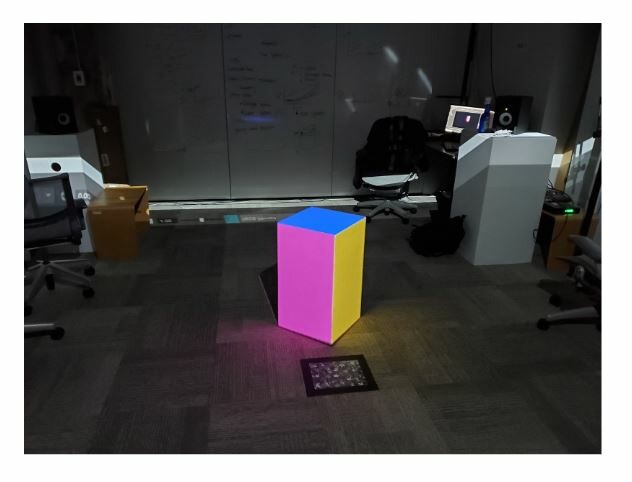
This week I took my first steps into the projection mapping world. I acquired help setting up a projector, white box, and a computer space In one of the sim labs during the beginning of the week. Showed in the picture above is the result of my first projection mapping test. I used Maya to make a digital box, modeled after the real box sitting in the middle of the room. To alter the surface color of the real box, I projected the live Maya render of the digital colored box, onto the real box. The end result looked great in person. The cube looked like it was emitting light, and the reflected light bouncing off the carpet helped sell the idea of light coming from the cube. I also looked into Isadora this week. I was able to create a shape, change the shapes color, translate the shape in 2D space, and project it.
At the end of the week, I had a long and wonderful conversation with Jeff Haase, he gave me a book to read: War Fever by J.G. Ballard, and he is getting me in contact with a set designer student he knows. I have been reading: Digital Media, Projection Design and Technology for Theatre and have found some interesting nuggets of knowledge. The beginning of the book lays out an abstract definition about what a motion designer is along with what they should be able to do/might need to know. I found it immensely interesting how precisely I fit within the ideas presented within the book. Another reinsurance I am on the right path and doing the right things.
Choices Made
For my first projection mapping test I worked inside of Maya because it was the most straightforward. Set up a box in the real world, make a box in the digital world, and project the digital box on the real box, done! The setup was the hardest part of the process. I started with a red cube with a gray environment inside of Maya, but quickly found I couldn't identify the three different sides of the cube when projected, so each side of the cube got a different color. The next step was to exactly match the perspective of the real cube to the digital cube. Working within a locked camera view inside of Maya, I strictly translated and rotated the cube only until the tops of the cubs matched. I then extruded the box in Maya until the proportions matched the real box. Finally, I ended up shifting different vertices of the digital box in Maya, almost like corner pinning, the Maya shape was geometrically perfect and the real box is made of wood and not perfect.
Likely Next Steps
This week I am diving further into Isadora. I will try and recreate what I did in Maya, but using Isadora, and hopefully with some added movement and animation. From what I know, Isadora is a projection mapping software and should be able to do what I need it to do. This week I will also continue to read: Digital Media, Projection Design and Technology for Theatre. I also want to head over to the theatre specialty's library later this week to see what's over there and if anything immediately relevant peaks my interest.