Website powered by

6/9/21 - Summer of Electronics

General / 10 January 2022


Approach

This week starts my first of many entries documenting my self guided exploration into electronics. I will be focusing on 5V electronics with micro boards, LEDs, Buttons and hopefully some servo motors. I have some experience in Java scrip coding (witch might come in handy) and I have worked with rewiring lighting instruments and extension cords in Theatre, but I have no other preestablished skills within electronics.

Connections 

I sent emails to professors within ACCAD asking/looking for possible resources or materials I could use to get started. I was given some links and resources to look through.

  1. Microcontroller Introduction
  2. Adafruit
  3. Circuit Bending
  4. Video Modular Synthesis

Reflection

I looked through the Adafruit website and found a project example using a solar panel . I also looked through some Adafriut Circuit playground Bluefruit projects. I was curious what CircuitPython was and learned that it is a relatively "easy to learn" hard coding programing language. While exploring possible projects to create this summer I feel in love with Circuit Bending and Video Modular Synthesizers. However, these projects seem out of scope or more involved in a specific direction than I am willing to spend. The goal of this summer is to gain a basic overall skill in electronics. I want to work with Arduino, buttons, LEDs, and some Servo.

Zoom Annotation

General / 15 September 2021


Project Goals

1) Create some sort of interactive experience. (I am using the word experience very loosely for this project)

2) Do something fun for myself, and hopefully others, to use or customize. 

3) Use the video communications software Zoom in some capacity.


Zoom

Starting with Zoom, Initially I have some problems with the Zoom system/interface. First, I find it hard to have casual large group conversations. In a group Zoom setting, only one person can speak at a time, meaning not everyone will feel comfortable speaking in front of everyone, and the conversation moves slower and tends to last longer. Also depending on the quality of the users microphone, or internet, simply hearing other people can become a problem.

Second, Zoom has a limited amount of in camera "Reactions" to choose from. Currently in the most recent Zoom update there are only 6 emoticons to choose from. And they include. Hands clapping, a thumbs up, a red heart, cry laughing face, shocked face, and a party horn with confetti. These emoticons, when clicked, appear in the top right corner of the user's screen and allows participants to communicate nonverbally.


Approach 

As a possible solution to these problems, It would seem to be useful for Zoom to utilize and introduce more nonverbal communication strategies to the interface. So this is what I tried to prototype. For this project I decided to try and create additional "Zoom Reactions" (or what I am calling "Zoom annotations") for others to utilize, customize, and share. The idea is for users to have an external document with a list of customized buttons that, when pressed, will display unique emoticons, banners, filters, text, or any image into the users Zoom window for everyone in the meeting to see. As an example: when I click on the “HELLO” button, the text "HELLO" will appear in the corner of my Zoom window.

Knowing I couldn't add my own annotations directory to the Zoom interface I needed to conceive a path for other software's to communicate with Zoom. I also needed to pick an external software/program that would allow me to make customized buttons with. The programs and tools I decided to use within my system, in addition to Zoom, are: 1) P5.js - an accessible and inclusive JavaScript library for creative coding. 2) Open Broadcaster Software (OBS) - an open source streaming software. 3) A Web Camera. 4) Photoshop. All of these software's are free to use or download (if you don't have access to Photoshop you could also use PNG's from the internet) so, if you have a web camera and access to the internet, you too can make your very own Zoom annotations and decorate your zoom window however you like. Also by no means is this the only way for this system to function and other programs could most definitely be substituted or changed, use whatever programs or systems work best for you to achieve the same (or better) results.


Depth Camera CT Scan Projection System

General / 06 December 2020


What makes dynamic projection mapping dynamic?

Recently I have been looking into dynamic projection mapping and questioned what makes dynamic projection mapping “Dynamic”? I asked Google and she said: Dynamic means characterized by constant change, activity, or progress. I assumed that means for a projection mapping system to be called “dynamic” something in the system would have to involve actual physical movement of some kind. Like the audience, the physical projector, or the object being projected onto. So, what makes dynamic projection mapping “dynamic” well from my classification the use of physical movement within a projection mapped system is the separation between projection mapping and dynamic projection mapping. 


How does dynamic projection mapping work?

So, most dynamic projection systems use a high speed projector (meaning a projector that can project images at a high frame rate, this is to reduce output lag). Then an array of focal lenses and drivers are used (to change the focus of the projector output in real time). A depth camera (to measure the distance between the object being projected onto and the projector) and then a computer system with some sort of software to allow the projector, depth camera, and focusing lens to talk to each other. After understanding the inner workings of how some dynamic projection systems work I started to look further into how a depth camera works and how important depth is within a dynamic projection system.


What is a depth camera and how does depth work?

As I have mentioned before, depth cameras measure distance, specifically the distance between the camera and every pixel captured within the lens. The distance of each pixel is then transcribed into a visual representation like color or value. Over the years depth images have taken many appearances based on different companies and camera systems. Some depth images use gray scale and use brighter values to show objects closer to the camera and darker values to signify objects further in the distance. Each shade of gray would also be tied to a specific value allowing the user to understand visually how far something is from the depth camera. Other systems use color, while using warmer versus cooler colors to measure depth visually.


How is the distance typically measured on an average depth camera?

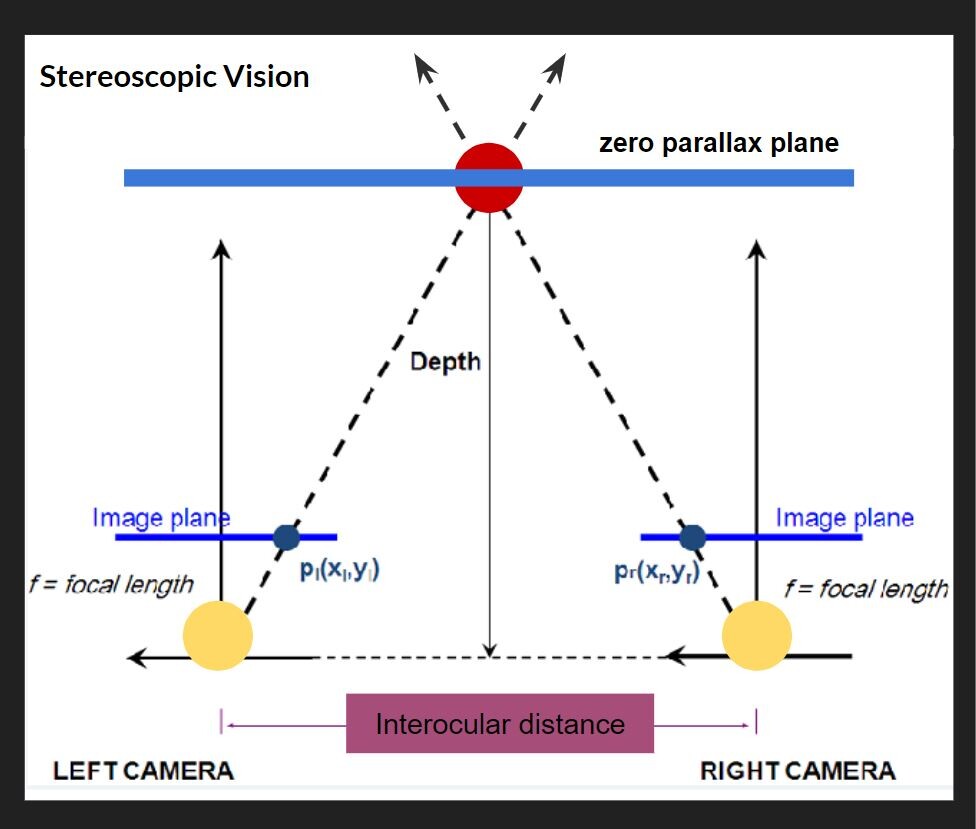
Basically most depth cameras work, the same way your eyes create depth through “Stereoscopic Vision”. For this Stereoscopic Vision to work you need two cameras (or two eyes) in this top down diagram (pictured above), the cameras are the two large yellow circles and the space between them is called the interocular (IN-ter-ocular) distance. This distance never changes, however, this ratio needs to be at a precise distance because if the interocular distance is too close or too far apart the effect won't work. On the diagram the dotted line shows the cameras are both looking at the red circle. The point at which both camera sight lines cross is called the zero parallax plane, and on this plane all objects are in focus. This means every object that lives in front and behind the zero parallax plane is out of focus. Everyone at home can try this, If you hold your index finger a foot away from your face, and look at your finger, everything in your view, except your finger, becomes out of focus, and with your other hand slid it left and right across your imaginary zero parallax plane, with your eyes still focused on your finger you should notice your other hand is also in focus. There are also different kinds of stereotypes, another common type is Parallel, on the diagram, the two parallel solid lines coming from the yellow circles point straight out. Parallel means these lines will never meet and also mean everything will stay in focus. If you look out your window into the horizon, you will see everything is in focus, the trees, buildings, cars, people, the sky. For those of us who don’t have windows, Stereoscopic and parallel vision can also be recreated and simulated inside of different 3D animation software like Maya or blender. For those who understand 3D animation cameras and rendering, if you render an animation with parallel vision and place the rendered video into Nuke (a very expensive and amazing node and wires based effects and video editing software) you can add the zero parallax plane in post. This is also the system Pixar uses in all of its animated feature films.


Prototyping

After understanding a little more about how depth cameras work I decided to try and conceive a project using an Astra Orbbec (depth camera), a pico projector (small handheld projector), and Isadora (projection mapping software). Using a depth camera I wanted to try and prototype a dynamic projection mapping system, where the object being projected onto would move in space causing the projection to change or evolve in some way. I ended up using a set of top down human brain computed tomography scans (CT scans) as the evolving or “changing” aspect of my system. The CT scans would be projected onto regular printer paper held in front of the projector and depth camera. The depth camera would read the depth at which the paper is at in space. As the piece of paper moves closer or further away from the depth camera, the CT scan images would cycle through. (above is what the system looked like inside of Isadora and below is a video showing the CT scans evolving in space in real time as the paper movies back and forth from the depth camera) Within the system I add color signifiers to tell the user at what depth to hold the paper at and when to stop moving the paper. I used the color “green” to tell the user to start “here” and the color “red” to tell the user to “stop”. I also added numbers to each ST scan image so the user can identify or reference a specific image.


Conclusion

The finished prototype works fairly well and I am very pleased with the fidelity of the Orbbec depth reading. For my system, I could only work within a specific range in front of my projector, this is because the projected image would become out of focus if I moved the paper too far or too close relative to the projector. While I worked with the projector I found the human body could also be used inplace of the piece of paper, with the projected image of the SC scans filling my shirt front. The projector could also be projected at a different wall with a human interacting with the depth camera alone, causing the ST scans to change as well. With a more refined system I can imagine this could be used in many circumstances. This system could be used within an interactive medical museum exhibit, or even in a more professional medical setting to explain how ST scans work to child cancer patients. For possible future iterations I would like to see if I could incorporate the projection to better follow the paper, having the projector tilt and scale with the paper would allow the system to become more dynamic and possibly more user friendly.

"If we all speak machine, then we can all avoid Big Tech’s blunders"

General / 05 November 2020


The 2020 CX report has been released (https://cx.report/) and touched on some topics about the effects of big business with the perspective rise in independent/small business in America. Possibly suggesting big tech businesses are a fad, as long as the majority of a population can speak the "tech langage". However, most big tech do an incredible amount of gatekeeping to insure the longevity of big corporation "monopolies" such as Google, Disney, Apple, Amazon, Walmart, Microsoft, Mcdonalds... so on and so forth. I will explain what I mean by "big tech is a fad" and how small business could overcome the emench reach of big businesses. I should preface I am not a business expert and these are my opinions. 

First, a quick and brief history, "fads" have existed within business for a long time, as an example: between the 1700’s and 1800’s big business didn’t exist. People shopped at local independent mom and pop stores that sold generally everything one would need. These items would be collected to sell from local vendors from neighboring towns and small farms, usually handmade using homemade tools. In the mid 1800’s and early 1900’s an agricultural manufacturing boom started with the manufacturing of steel, oil, and textiles. This rapid growth killed small business farms and allowed for more food to be manufactured. With the increased wealth, in select populations of american people, several retail stores grew to meet the evolving american taste. These stores being Sears, Macy's, Bloomingdales... Advancements in bank credit and cash registers allowed Americans to buy safer and faster. Between the 1950's and 1980’s home repair services, Diners, and small town main street business thrived in suburban residential areas. However, as planned obsolescence, shopping malls, fast food chain restaurants, and big box stores increased in the 1980’s to 1990's; this led to the decline in mom and pop stores and killed “downtown culture” along with family owned dinners. From the 2000’s to 2020, with the rise of online shopping, shopping malls have since died out. Around the 2010’s there was a fast rise and fall of online subscription box delivery services. For a better part of two decades, industry has been saying coal and oil is “on its way out.” This has forced the automotive industry to completely reconstruct their business models, along with the electronic manufacturing industry. In the latter parts of the 2010’s A large cultural business trend of reselling nostalgia was hot, however, it is predicted to die out soon. In 2020 covid 19 killed a good number of small family owned brick-and-mortar-stores and restaurants, who'll most likely not return. This also coincides with online shopping emerging as the popular choice of shopping and delivery during the pandemic.

I understand this short history of mainstream consumer business is more of a logical “evolution” or a likely next step roadmap than a fad chart of big business. However, I said “fad” in relation to big business because there is every chance for a resurgence of small family owned stores and restaurants, and I can see family-owned businesses could possibly surpass big businesses. Resulting in the killing of the monopolistic Industry funnel necking, innovation depleting system we currently have today. I find the struggle of overcoming big business is first overcoming the immense gate keeping these businesses are doing. Within the 2020 CX report it said “If we all speak machine, then we can all avoid Big Tech’s blunders.” This is to say: if people knew how to make a smartphone, why buy one from Apple. However, not everyone A) wants to build a DIY phone, or B) has the resources to DIY a phone. BUT! imagine if everyone had a basic knowledge of how Apple phones are constructed, how to repair them, and people could make phone alterations. Imagine if Apple supported and encouraged people to make their own phones. This idea is similar to community gardens and farmers markets competing with big name grocery stores. Everyone understands how to grow vegetables at home or within a community (put seeds in dirt, add water). By allowing people to grow and sell their own fruits and vegetables, a diverse variety of produce is pushed in circulation. On the same hand big name grocery stores can not sell every variety of vegetable or fruit sustainably, inadvertently encouraging people to grow produce at home. Currently big tech companies are saying “this is what people want” and “this is what people will get.” If big tech businesses operate in a way closer to how greenhouses operate (by selling plants, seeds, dirt, pots, individual components of a system) by opening and showing the process and constructing technology with user altercation and creativity in mind, rather than profit. This would allow the average person, or small family owned business, to make their own cell phone to eventually compete with Apple or Microsoft. Creating a faster evolving, innovative, and technologically savvy society. As illustrated in the beginning, business patterns will/have changed over time, people of the 80’s assumed shopping malls would be the future and last forever, people are also currently saying the same thing about online shopping. Groups of people are currently trying to predict what's going to replace the internet in the future. Big businesses have not been around forever, and nothing says they will last forever.


JOURNAL 10/5/20: Progress & Process

General / 05 October 2020


This current mess of a mind map stemmed from three topics: 1) Covid-19  2) Coding  3) Themed Entertainment Design. Everything is color coded. Red being things I don't care about, yellow a things I kinda care about, and green things I care the most about. The exclamation points mark what I'm actively looking into. The black things are questions I have.

I have been making some interesting connections with puppetry and animatronics. I rediscovered realtime CGI puppets (I first found during my motion-capture research from the spring). Examples of CGI puppets within themed entertainment (specifically the Disney parks) are "Turtle Talk With Crush" and The Monsters Ink Laugh Floor" It's a lot like a video game where someone controls the characters moments with a mix of pre-rendered and realtime animation, and the puppeteer works with a voice actor to complete the character. Very similar to motion-capture in a way, or even a Instagram or Snapchat filter. I am beginning to understand it might become important for me to learn how to code arduinos for "actual robotic" animatronics. I don't have much coding experience. I have taken a Visual Basic programing class during my undergraduate. However, the class was mainly spent on making spreadsheets, not very creative or fun. Since then I thought I would never touch coding again. I couldn't see a use for it in my own work at the time. Since then, I have seen coding popping up within my research of entertainment design, projection mapping, and lighting design. So I am giving coding a second chance. After talking to some people they recommend me to look into p5.js and gave me some helpful links and tutorials to look at. The tutorials are from a YouTube channel called "The coding train," supper fun and helpful, Dan (the teacher) is great! Thus far I have a made shapes follow my mouse, change shape and background color, along with some other cool things. Bellow is a link to the program I made with said things I have learned using p5.js. Its nothing fancy, just a test.

CLICK THE LINK! ( <iframe src="https://editor.p5js.org/kgolson7/embed/5S3UQGSYU"></iframe>  (Links to an external site.)

Im still making connections with my other two topics as-well. Animatronic Control Systems have peaked my interest and I found a dude who sells a kit that allows you to make an audio animatronic crow. Unsure if purchasing and building the thing would worth the cost. I am still trying to figure out how specifically animatronics fit into my overall interests. I'm not an engineer, Im not interested in fabricating metal, plastic, or 3D printing, i'm not an electrician, but designing an animatronic by working with a team of fabricators, engineers, and electricians sounds fun. I could then perform/animate the animatronic along with making the animatronic look cool on paper. I do, however, have some theatre prop making skills and could possibly do some post creation cosmetic additives to an animatronic.

During some down time, I took another look at my mind map and reread my unanswered questions around the future of themed entertainment. Specifically  "How do you design the future?" or "What does the future physically look like?" or "How do you design for constant evolution?" more anticipatory design questions. I dove into these question a smidge, but soon realized these questions are probably going to lead to blackholes and push me farther away from my main research goals. I also looked over my current Grad portfolio and assessed I needed more concept visualizations, like prototyped drawings. Something that can visually show a growth of process (I think my peppers ghost research from last year was a good example of this, drawing an idea out on paper and then actually creating a thing or a polished visualization of the thing). I could do something like this again by possibly designing an animatronic or a futuristic looking theme park, however, that might be an ambition idea. I'm not sure. Just doing a lot of thinking and list making recently.

On a different note I signed up for the free Blooloop V-Expo. A virtual conference and exhibition for attractions professionals, themed entertainment designers, and more. If anyone else wishes to sign up! Click the link below! It takes place online during Oct 13-15th! You can also preview the full agenda in the link below. Im not payed to say this (but I wouldn't say no to a payed sponsorship). This is just a great opportunity for anyone wanting to get into the field of entertainment design.

https://blooloop.com/news/blooloop-vexpo-agenda/ (Links to an external site.) 

Isadora Pressure Project 1

General / 11 September 2020

This video was what I used as inspiration for this project: https://www.youtube.com/watch?v=yVkdfJ9PkRQ

I gave myself 3 hours and I wanted to create a looping and evolving "vaporwave aesthetic" visualization in Isadora. I found a video (linked above) of different length pendulums swinging and I wanted to try and recreate it. Once the Math was figured out the overall pattern was very simple. I added A black frame and a grid for aesthetic purposes (the 'Nodes' pictured above). The main chunk of the magic lives inside of the 'User Actors'.

Inside each 'User Actor' Is a 'Wave Generator' feeding into the 'Hue' of a 'Colorize Node' (the min and max of the 'Colorize Hue' are min:80 max:95) and the 'horizontal position' of the 'Shapes Node'. The 'Shape Node' 'scale value' is 10. Then the 'Shapes Node' 'video out' feeds into the 'Colorize Node' 'texture in'. Next the 'Colorize Node' goes into the 'texture in' of a 'shift Glitch Node' (this is for looks and adds a fun glitching effect). I should also note the values of: 'frequency', 'vertical', 'horizontal', and 'size' on the 'Shift Glitch Node' are all set at 1. Then the 'texture out' of the 'Shift Glitch' goes into the 'video in' of a 'Motion Blur Node' with 'accumulation amount' set to 100 and 'decay amount' set to 70. Next the 'video out' of the Motion Blur Node' goes into the 'video' of a 'Projector Node'. Finally I added a 'User Input Node' into the 'vertical position' of the 'Shapes Node' and another 'User Input' into the 'frequency' of the 'Wave Generator Node'. When completed the result should look like something similar to the above image. (you can now 'save and update all' and leave the 'User Actor Window' )

Now this is when the Fun starts. Back in the main composition window of Isadora you should have a newly created 'User Actor' with 2 adjustable values ('frequency' and 'vertical position'). To get started adjust the 'frequency' to 0.28 Hz and the 'vertical position' to 45. You can then duplicate the 'User Actor' as many times as you please. The trick is to subtract 0.01Hz from the 'frequency' and subtract 5 from the 'vertical position' in a descending pattern with every additional 'User Actor' (My 1st 'User Actor' starts with a 'frequency' of 0.28 Hz and a 'vertical position' of 45 ending with my 19th 'User Actor' with a 'frequency' of 0.1 Hz and a 'vertical position' of -45)

To reset the program simply reenter the current scene from a previous scene (with a "Keyboard Watcher Node" and a "Jump++ Node" or by using the 'space bar')

I should also note: as long as all the 'User Actors' are separated by a constant 'frequency' and 'vertical position' (or 'horizontal position') value from each other (in either a positive or negative direction) the pattern will continue on forever in said direction.

A fun thing about creating this mathematical visualization digitally is there is no friction involved (as shown in the video example, eventually the balls will stop swinging) meaning this pattern will repeat and never stop until Isadora is closed.


JOURNAL 9/6: Weekly Progress & Process

General / 07 September 2020

This will be less of a “week update” and more of a depository of links and resources I have been accumulating over the week. My current “research spaces” are  1) Themed entertainment design  2) covid19/post covid19  3). coding

Over the course of the week I found some helpful industry resources around themed entertainment design:

     1) https://www.teaconnect.org/index.cfm (Links to an external site.)

Themed Entertainment Association (TEA) website. TEA represents entertainment designers in the same way the Screen Actors Guild (SAG-AFTRA) supports performers (it's a union). Also attached to TEA are the THEA Awards (it's like the Oscars or Tony awards for themed entertainment)

     2) https://blooloop.com/ (Links to an external site.)

Blooloop: networking the attractions business website. Blooloop is the world's leading online resource for professionals working in the visitor attractions sector. Wonderful place to find attraction news and updates around Museums, Water Parks, Theme Parks, Zoos, and Aquariums.

     3) https://blooloop.com/event/blooloop-v-expo-2020/ (Links to an external site.)

also attached to Blooloop is a FREE Virtual Expo and Conference on October 13-15 2020 around Visitor Attractions Industry.

     4) https://www.tpegosu.com/site (Links to an external site.)

Did you know OSU has a theme park engineering group! I didn't.

     5) https://www.youtube.com/user/klingp2004/videos (Links to an external site.)

“RealPatrickKling” is a youtube page with an AMAZING catalog of themed entertainment design related discussion / Q&A type / podcast like shows. This page started because of Covid19 and uploads new content regularly talking about theme parks and Covid19.

     6) http://haashow.com/ (Links to an external site.)

Transworld’s Halloween and Attractions Show! Transworld is a trade show with seminars and educational events all around the haunt attraction industry. (They also do a Christmas Trade show, but Halloween is a superior holiday). The next convention is: March 19-22, 2021. I would like to attend Transworld in the spring!! (If we are all still alive by then)

     7) https://www.thevoid.com/ (Links to an external site.)

This is the website of a VR company called the VOID and could become the future of Theme Parks / entertainment in general. Also a neat idea for a haunted attraction.

JOURNAL 4/21: Weekly Progress & Process

General / 24 April 2020


Approach

This week was spent finalizing the audio track for the short, reconfiguring some elements after the week's critique, and trying a different method of creating assets for isadora by working in After Effects. To harden the scope of the project I finalized the audio. For making the audio I worked within Audacity. I mixed together a score from Hans Zimmer's Interstellar, tropical bird soundscape, vinyl white noise, and a cymbal swoosh. I added some effects to all of the audio tracks to better blend the sounds together. I also adjusted the tracks decibel levels so the tracks were not competing with each other. In the end the audio tract is just about fifteen seconds over three minutes. After presenting and digesting the feedback from the class I decided to lean on more optical illusions which shift and change prospect rather than still illusions. Rather than simply showing objects interacting within the space created on the door, I am having the said created space be more a part of the show dynamically by moving and shifting perspective. Additionally, a realization occurred this week, since this projection mapping show will most likely only be seen in person by me, and then recorded for others to see, I should be making the show for the cameras eyes not my own eyes. I have the ability to control what the audience will see through the power of the camera. Given this opportunity, I am tweaking the visuals to work better on film, and I am also blocking how the camera will be interacting with the door. The camera will no longer simply be a stationary recording device, but an equal and critical storytelling tool. During the end of the week I have received an email from noelle and I am working with her to render After Effects files using the ACCAD servers, thus this will allow me to ramp up on the production side of things. Hopefully, allowing me to gain a quicker workflow. Due to my computer latency, keeping Isadora from running at full capacity,  I have devised a work around to avoid issadora playback issues. Instead of mapping video renders to the door using Isadora, I am mapping video files onto an image of the door inside of After Effects. I am then rendering the After Effects files, without the door, and mapping siad video to the door using Isadora. The result is a more dynamic, seamless, and refined projection, for the content being projected is not restrained to my average abilities of working with isadora, and the feedback workflow becomes faster. As I am now creating assets and working on the door in After Effects, meaning, what I see in After Effects becomes exactly what I see on the door in real life. Opposed to my previous system of: rendering things from After Effects, testing them on the door, then re rendering adjustments until I am pleased. I'm not sure why I haven't been utilizing my new system of working before, it's much more efficient.

Above is the image of the door I am working from in After Effects. To test if this system worked, I simply placed this image of the door in Isadora and mapped the door image back on to the real door. The result was an odd visual of a door mapped onto the exact door, the system works!


JOURNAL 4/14: Weekly Progress & Process

General / 24 April 2020


Approach

This week I finished workinging with Imagineering in a box video series. The final chapter this week covered character design. As I mentioned in the beginning of this project, I did not expect to learn anything necessarily revolutionary or ground breaking, but understand how to repurpose what I know in a different context. As a whole the videos were a helpful world building, character creation, and story development 3 week intensive. The series also showed a dim light into what full time imagineers do daily. As a possible career opportunity, it is reassuring that more jobs exist which could utilize my unique mix of interests and skill sets. Understanding a full time position working for Disney is a lofty goal, however, internship opportunities offered within imagineering seem less imposible, and something I'm interested in working towards.

This week I also continued to develop and refine the look of the main character in the short. Below is the mood board and look I am trying to achieve. 

Link to full mood board https://www.pinterest.com/kgolson7/light-mood-board/ 

Ideally I would be working in Arnold render in Maya to achieve the desired look. However, due to several circumstances (including: rendering times and access to Arnold) I have been looking into a cheaper way of achieving the same effect Arnold gives. I am attempting to do this by rendering animation out of Maya using Hardware renderer and adding layers of effects in After Effects. In the end, I didn’t necessarily create an Arnold work around, but I did run into an interesting grouping of effects, inside of After Effects, to create something different but similar. Below are a couple of screenshots of what I am currently working inside of After Effects. 

I would like to add highlights to the black shapes to make the form feel more three dimensional, but for the most part I am pleased with the current turn of events. For context, this black blob moves around the door in an organic way, transforming, and shifting into different rigid and liquid states.


Rendering

As a twisted turn of events, working in After Effects was meant to speed rendering times, and for the most part it has, however, as I start compiling different effects and procedures together in After Effects, the render times get longer. This next week I will hopefully be finishing rendering. Thus far the render times have been manageable. I did a test render of the 1 minute 30 second scene utilizing the blob (depicted above) and it's going to take about 6 to 8 hours. I am hoping not to have many more long renders as I can’t do anything else while the computer renders. I'm trying to render things overnight to keep up. Not a major inconvenience, but I just have to stay flexible with my schedule and be smart with my time.


Link to Imagineering in a box

https://www.youtube.com/watch?v=VcXlEH5sTVI&list=PLZuKWjoQGMP4MB9UfsCaGTqU-wPPGZK0-&index=3

JOURNAL 4/7: Weekly Progress & Process

General / 24 April 2020

Approach

This week I worked through the second chapter of Imagineering in a box: Attraction Design. The latter lessons within the chapter started to become less prevalent to my current work, however, the information was interesting and noteworthy nevertheless. The imagineering In A Box lesson covering “design pitching ” was somewhat helpful for the 6300 end of year review presentation. Explaining how to share and present creative work while also giving and receiving feedback. The most useful lesson within this week's chapter for 6400 was storyboarding from an imagineering perspective. Quinsedently, this week I also created a set of storyboards for my projection mapping short. Along with a brief look into 1960s design and architecture for inspiration. Finally, this week I further developed my character design and effects for said character.

The storyboards (pictured above) are not in order and show only the key moments of the story. The visuals of the story will start black, then slowly add color revealing the main character (a light emitting, color and shape shifting blob), finally it will end by peeling away color until everything is white and the blob dissolves or disappears into the white.


Research and Character Development

I dove deeper into the design of the main character of the short (the light emitting, color and shape shifting blob). I played around with different silhouettes of the character and did a small shape study. The door is a rectangular object so I wanted to stay away from hard structured objects and I worked with more fluid imagery. I did a rough color pass using watercolor over a few of the shapes to visualize a possible developed look. I am also interested in adding layers of post processing to the abstract forms to achieve an organic glitching effect. I am trying to create a science fiction, futuristic, alien like creature. (video and audio test of organic glitching: https://www.instagram.com/p/B-gs-DfBEFg/?utm_source=ig_web_copy_link) the test was somewhat successful. I am still trying to achieve a better sense of form and depth, but working with a rendered Maya sphere instead of an After Effects circle might solve my issues.

I am working inside of Maya to create an “ alien sphere rig”. Below is a Maya snapshot. The shape on the far left is the character model, and the other three shapes are blend shapes influencing the main model. I will be adding more blend shapes in the future to allow the character to take several dynamic forms.The visuals will then be rendered out of Maya using Maya Hardware renderer and will be edited hevely in After Effects using the developed post processing system.


Link to Imagineering in a box

https://www.youtube.com/watch?v=VcXlEH5sTVI&list=PLZuKWjoQGMP4MB9UfsCaGTqU-wPPGZK0-&index=3

During the week I watched several 1960s architecture videos and looked into Art Nouveau for color, shape, and form references

Where the 1960’s Psychedelic look came from:

https://www.youtube.com/watch?v=9vuqI2v2IRs


Mid Century architecture 

https://www.youtube.com/watch?v=K_YZbp-MmEo