Website powered by

JOURNAL 3/31: Weekly Progress & Process

General / 24 April 2020

Approach

This week I began to go through the first chapter of Imagineering In A Box: Creating Worlds. The videos are helpful and thought provoking, bringing new ways to thinking about a creative problem. Some of the more interesting ideas presented within the first chapter are around environmental storytelling. Understanding environmental storytelling is a different type of storytelling from film, animation, and theatre. The largest differences being, environmental storytelling is nonlinear and the audience is a part of the narrative. Understandably, a great deal of time is spent on developing the theme, story, and understanding the difference between the two from a creative perspective and audience perspective.


The story and a theme I developed

Story: a love story between two shapes and they communicate through light.

Theme: love transcends dimensions of time and space. 


Research and Additional Learning Resources

I started creating a mood board (part of the mood board is seen below) with images using light in a dynamic way. I gravitated towards gallery installations using large floods of saturated light, and complex shadow arrangements. I also fell in love with mixing different light hues to create watercolor like or gouache like paintings effects on different surfaces. 

link to full mood board: https://www.pinterest.com/kgolson7/light-mood-board/ 

I played around with the projector within my apartment space. This was perhaps the hardest part of the week. Originally I wanted to project onto the fireplace, because it's the most dynamic object within my living space. However, due to the smallness of the space the only way I could get the full fireplace covered is by putting the projector at a relatively sharp angle. The angle seemed to play with the focus of the projection in an odd way, the projector lost a lot of detail from being at such a sharp angle. Also the red tile around the center of the fireplace was not ideal for picking up color. I ended up changing surfaces and tried projecting onto a white door with trim and recessed panels. The overall setup was better and the quality of the projection was clear and noticeable. The door is going to be a different challenge than the box I was used to working with from the lab. First, the door is much larger and houses more detail than the box. The door is asymmetric with a brass knob on one side with painted hinges on the other. The box was symmetrical and had a better sense of 3D, the door more resembles a screen than a cube. SO! My job is to transform the door into something different, treat the door unlike a 2D screen, and create an engaging world within the door.

I ran a quick test (seen below) to see how Isadora, the projector, the door, and my computer set up will work for the remainder on the project; It looks like everything works great for the time being. I can’t foresee myself having any major technical problems at this point, fingers crossed.


(projected an image from my mood board, onto a door, using isadora)


Link to Imagineering in a box

https://www.youtube.com/watch?v=VcXlEH5sTVI&list=PLZuKWjoQGMP4MB9UfsCaGTqU-wPPGZK0-&index=3


During the week I watched and listened to several podcasts, interviews and panels covering imagineering, visual storytelling, and theme park design.


Link to Jason Scheier: color and light visual storytelling demonstration

https://www.youtube.com/watch?v=UUL4Ddo6hZg&list=WL&index=127&t=0s


Link to Defunctland Podcast Season 1 (interviews with imagineers and theme park designers)

https://www.youtube.com/watch?v=czoP1S-qDXU&list=PLplWWKocAfTbAFol7WXYaTE9S--BI2Xnr


Link to Location Based Interactive Storytelling: The Walt Disney Imagineering way.
https://www.youtube.com/watch?v=jARbugWnrB0

JOURNAL 3/10: Weekly Progress & Process

General / 24 April 2020


Approach

During the beginning of the week I handed over my projection mapping space to the game testing event. Due to this event I had to move my projector, cube, and markers on the ground. This might have sounded like a nightmare to put back together, but ended up becoming helpful in the long run. Resetting my projection mapping setup allowed me to move the box and projector to a better location for an audience's viewing for Thursday. While my space was occupied I continued to find other examples of simple projection mapping. I also started to look into how I can integrate audio into my work. Throughout the week I have been looking for a short 2 - 3 minute long song as a base for my next project. I have found the audio used in most projection mapping shows utilizes a contrast in rhythm, pitch, and tone. This is because a more dynamic sound tends to lend to dynamic visuals. 

During the presentation on Thursday I noticed some interesting things. First, I noticed when the projections started people would audibly react. Second, I noticed people would start touching the box or the projected light. I myself had this same wonder and amazement when the box would shift colors and textures in the beginning. I’m not sure what to do with this information, but I thought these observations were interesting. Maybe in the future I could incorporate this impuls of touch with projection mapping in some sort of touch sensory experience.


Relevant Sources and Research

I have continued to look at Disney park projection mapping, firework, laser, and water shows for audio inspiration to do projection mapping with. I have been looking for a dynamic song with layers and a range in tempos.I have accumulated a list of possible songs, this is the top three from the list of possible songs:

https://www.youtube.com/watch?v=MPSrXCwT1P0

https://www.youtube.com/watch?v=luQSQuCHtcI&list=WL&index=92&t=0s

https://www.youtube.com/watch?v=fpnUrPUlJXY

JOURNAL 3/3: Weekly Progress & Process

General / 24 April 2020

Approach

I have picked up momentum after last week. Last week I had the ambitious idea I was going to incorporate human movement into a projection design. First, I started with what I knew, by creating a system inside of Isadora which allows the user to move projected objects by a computer mouse. My next task was to transfer control from a mouse to human movement.  Unsure of how I will be able to achieve a dynamic connection between computer and human, I began to ask around. I first went to Jess, and we began to troubleshoot together a system involving a web camera as an input device. The result of this system was a crude version of what I was after. Isadora could read real world movement through the web camera,translate said movement into a number, and use the number to tell objects in space how to move. Independently of Jess I began to streamline the system for efficiency. After a lot of finessing, most of the problems of long lag and projection glitches stopped. I went back to jess and then we wondered if a kinect would be better for an input. I also talked to Taylor and he suggested I look into the Beta version of Isadora where Kinect, or depth mapping, cameras are pre integrated into isadora. Meaning I wouldn't have to connect a depth mapping camera into isadora, saving time. 


Relevant Research

I realized, after Maria shared a couple helpful videos of projection mapping onto cubes, I myself have yet to look into what others have created using just cubes. So, I started looking around at cube specific projection mapping. 

https://vimeo.com/52222104

https://vimeo.com/24589639

https://www.youtube.com/watch?v=hq8S7CutgIE

Along with finding different cube specific projection mapping videos. I got curious and started using different key search terms, one of them being: Disney. I then found a projection mapping show on the Sleeping Beauty Castle in California. Not a cube, but gave me some ideas to work with. The Disney projection mapping show was complementing the visuals on the castle with a times audio tract. Working from the audio like a script or narrative guidelines to help support the visuals.

https://www.youtube.com/watch?v=HhV1LGw3A9U


Next Step

Using the disney castle projection show as inspiration I began to draw out 2D illustrations of how I can transform the box im working with into something other than a box. I also want to start working with the Isadora Beta and create a short interactive narrative using a song as a starting point.

JOURNAL 2/24: Weekly Progress & Process

General / 24 April 2020


Approach

This week I continued to teach myself projection mapping. I continued to follow the Isadora tutorials found on the Isadora website. I began the week by mapped shapes on to the same box as last week, but this time working in Isadora. After successfully recreating last week's design with three different colors on each side of the box, I began working towards projecting videos on the box. Working in After Effects, I created a video of color changing cubes with a pink grid. I then imported the rendered video from After Effects into Isadora and began laying the video on the different sides of the cube. After some struggles to achieve precise proportions from video to cube and unsatisfied with the quality of the projection I recruited the help of Jess. She gave many great tips and tricks to use inside of Isadora like how to properly mask and manipulate video files onto objects. Together we also messed with the projector in hopes to fix the quality of the video output, but we eventually switched out the projector for one with a finner pixel count. Once the projector was switched out the quality of the image looked clean and crisp. Using the helpful tips from Jess I began quick work of mapping the projection to the box. With the success of mapping a video to the box, I started adding other elements to the projection using Isadora. I quickly became comfortable using Isadora, even though there's still lots to understand about Isadora, I can get around the program and find tools with ease.


Likely Next Step

During the end of the week I began to think about what my likely next step would be. I first would like to try and add depth to the cube somehow. Then I had an engaging conversation with Taylor and together we looked back on my initial system design. The conversation went all over the place and Taylor gave me some things to think about like integrating interactivity to the projection mapping with motion capture and depth mapping cameras. Problems we came up with were how to get different softwares to talk to each other (Vicon and Motionbuilder talking to Isadora). An interesting research thread we also landed on was volumetric projection mapping, and how multiple projectors could work together and project on a moving object in space. So, my likely next step is working with dynamic projection mapping, and further researching how to get other programs to talk to Isadora. 


Relevant Sources and Research

With the help of Taylor, I have accumulated some links and resources to look into for next week. I will also like to talk to Vita, Tory, Jess, and possibly Alex this week and ask how to get Isadora to talk to other programs like Vicon. From my motion capture class, Vita gets Vicon to talk to Motion Builder, and I don’t know how that is done, but I imagine looking into how Vicon talks to MotionBuilder could be helpful information.


Helpful links

JOURNAL 2/17: Weekly Progress & Process

General / 24 April 2020


Approach

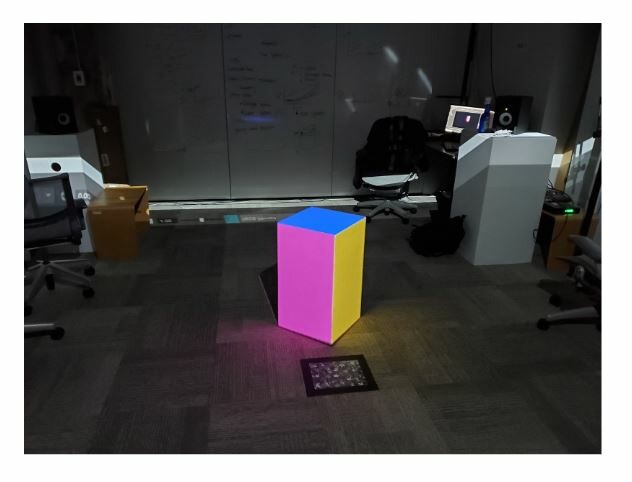
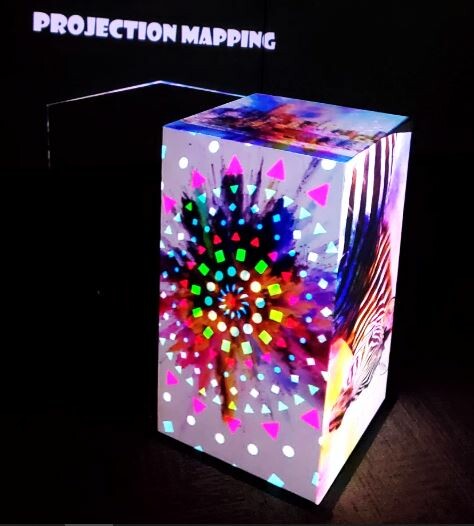
This week I took my first steps into the projection mapping world. I acquired help setting up a projector, white box, and a computer space In one of the sim labs during the beginning of the week. Showed in the picture above is the result of my first projection mapping test. I used Maya to make a digital box, modeled after the real box sitting in the middle of the room. To alter the surface color of the real box, I projected the live Maya render of the digital colored box, onto the real box. The end result looked great in person. The cube looked like it was emitting light, and the reflected light bouncing off the carpet helped sell the idea of light coming from the cube. I also looked into Isadora this week. I was able to create a shape, change the shapes color, translate the shape in 2D space, and project it. 

At the end of the week, I had a long and wonderful conversation with Jeff Haase, he gave me a book to read: War Fever by J.G. Ballard, and he is getting me in contact with a set designer student he knows. I have been reading: Digital Media, Projection Design and Technology for Theatre and have found some interesting nuggets of knowledge. The beginning of the book lays out an abstract definition about what a motion designer is along with what they should be able to do/might need to know. I found it immensely interesting how precisely I fit within the ideas presented within the book. Another reinsurance I am on the right path and doing the right things.


Choices Made

For my first projection mapping test I worked inside of Maya because it was the most straightforward. Set up a box in the real world, make a box in the digital world, and project the digital box on the real box, done! The setup was the hardest part of the process. I started with a red cube with a gray environment inside of Maya, but quickly found I couldn't identify the three different sides of the cube when projected, so each side of the cube got a different color. The next step was to exactly match the perspective of the real cube to the digital cube. Working within a locked camera view inside of Maya, I strictly translated and rotated the cube only until the tops of the cubs matched. I then extruded the box in Maya until the proportions matched the real box. Finally, I ended up shifting different vertices of the digital box in Maya, almost like corner pinning, the Maya shape was geometrically perfect and the real box is made of wood and not perfect.


Likely Next Steps

This week I am diving further into Isadora. I will try and recreate what I did in Maya, but using Isadora, and hopefully with some added movement and animation. From what I know, Isadora is a projection mapping software and should be able to do what I need it to do. This week I will also continue to read: Digital Media, Projection Design and Technology for Theatre. I also want to head over to the theatre specialty's library later this week to see what's over there and if anything immediately relevant peaks my interest.

JOURNAL 2/10: Weekly Progress & Process

General / 24 April 2020

Approach

This week I am shadowing Alex Oliszewski through the University of Iowa VR Club Residency. Thursday to Sunday of last week I met with several members of the VR Club from Iowa along with Jes, and Alex in the ACCAD motion lab. Together we started transforming the space into a VR theatrical experience. There was/is a lot of new terms, skills, and people I have met during the first couple of days. The largest take away thus far has been to take a step back and observe the process and ask as many questions as possible.


Choices Made

I chose to be apart of this project so I could gain on site experience and how emerging technologies could be implemented into a theatre system. An interesting technical system the show is using, incorporates volumetric capture as a replacement for green screens. Outside of the Iowa residency I am developing a system to use projection mapping and motion capture together to project animation on a moving actor. After working with the Iowa residency I might choose a volumetric system to capture the movement of the actor instead of motion capture. After talking to other people involved with the residency, I will also look into a system called "Black Trax". From what I know, Black Trax is similar to motion capture but has a better exclusion rate, meaning, the markers can be temporarily hidden from the receiving cameras and the tracking still computes. I am so grateful I have had the opportunity to be a part of this process. This experience has opened many doors of possibilities, showing there are other people with crazy ideas like myself.

Likely Next Steps

After this experience I have acquired a list of things to look into. One of the top items on the list is looking into Unity. For the residency a large important system element has been Unity. Since being at OSU my understatement of Unity has drastically changed. From what I understood Unity was just a video game making software, but I have learned Unity can be used to make animated shorts, real time rendered visualisation, anything VR, and interactive experiences. I currently have no knowledge of Unity. I can see the potential of using Unity within my own work and would like to learn more about the software.

JOURNAL 2/3: Weekly Progress & Process

General / 24 April 2020


Approach

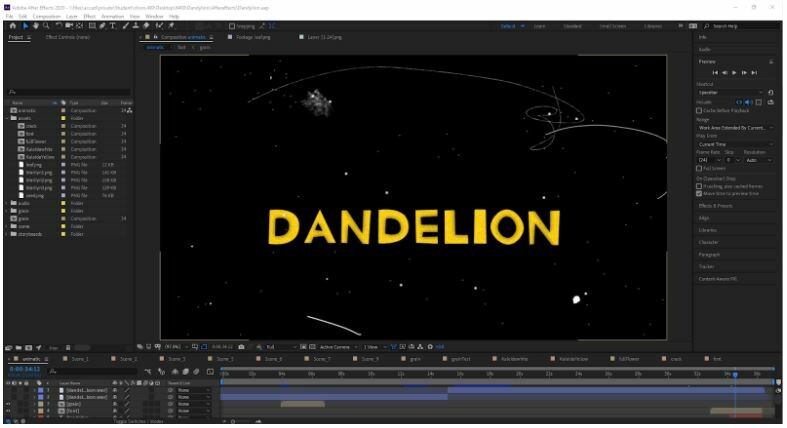
This week I focused on finishing the project. I continued to work from my list of hardest scenes to the easiest. As I added more sound elements. During the end of the week, I realized I didn't need a scene and the short is stronger for it. I also created my own font for the end title card and my own white noise. One of the last critical steps for the project was looking for strong cohesion between my individual scenes and transitions. During the beginning of the week I struggled for a moment but as the week continued I found clever solution to insure the short felt cohesive and finished.


Choices Made

One of the challenges this week was understanding how elements in the short could transition between each other. For most of the short, the assets are stationary and don't travel across the screen at all, but for most of my transitions objects need to move quickly and effortlessly. I needed to find a way to transition while making the moment seem purposeful. A good example of working out my problem became the last three senses of the short. The last three scenes cut from a close up of flying dandelion seeds, to a dandelion growing out of concrete, finally ending on a black screen with the words dandylion. I ended up asking myself what would a transition between these last three scenes look like if this was easy. My initial response was to remove the middle shot and connect the dandelion seeds floating away to the end title screen. So, after removing a scene from the end a clean and effortless transition appeared. It was in this moment I remembered the importance of self editing. I then looked at the rest of my scenes together and continued to self edit, asking what would be the easiest and most effective way to transition from shot to shot.


Relevant Sources or Inspirations

I ended up making my own white noise and film grain abeyance for the short. I researched different types of white noise and the difference between them.

This was one of the more interesting short videos I referenced: https://www.youtube.com/watch?v=NO2xgLAfQac


Current Questions

    The questions I have been asking myself are: does the short sound and look completed? What last minute choices can I make to push the short towards a more complete look? It is important in the last moments of working on a project to not over do it. I find the last details added to a project can either make or break the final product. I am doing what I can to add what is necessary but not over do final touches. The point of this film it to feel loose and rough and I don't want to restrict the final outcome.


Likely Next Steps

    Working on finishing details and ensuring everything is as it should be. As a final last step I will play my short over the projector, before completely finalizing the project. 

JOURNAL 1/27: Weekly Progress & Process

General / 24 April 2020
Approach
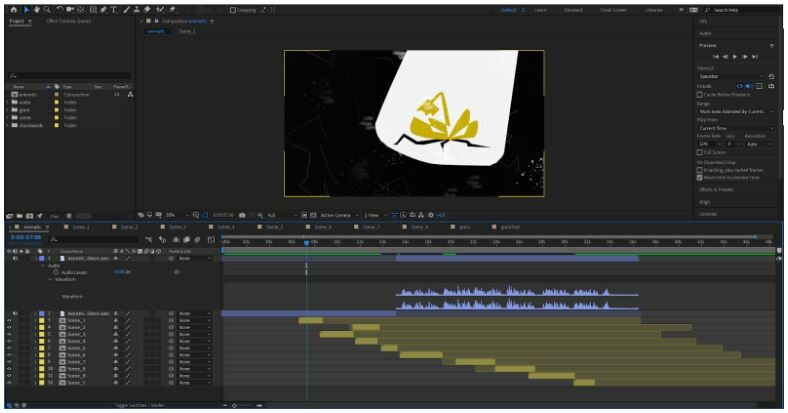
This week I continued to create refined version of my storyboards. Following the process I previously laid out of working closely with my storyboards, then asset creating in Photoshop, to laying out the assets After Effects. During this week I also made a mental note of what scenes were going to be the hardest to make. When I had an idea of what sense looked to be the largest challenge I went ahead and started to tackle the most challenging scenes. One of the most interesting challenges this week became how to present the idea of the dandelion transforming from a yellow flower to a white flower.An additional note: During this week's class it was very helpful to see and hear my project through the projector. It allowed me to more clearly see the texture and how it affected the quality of the final film. I will most definitely be adding this process of projecting my working film as I get increasingly further in finishing this project.

Choices Made
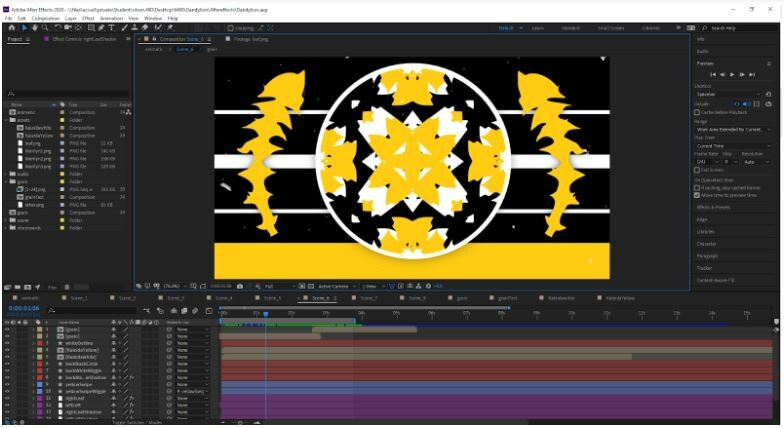
As I said before, a challenge this week was the dandelion transformation scene. I spent a lot of time going through many iterations of patterns and looked for the background of the scene. From my storyboards I had drawn a pattern of small circles, however, moving forward, I knew I wanted to use the silhouette of a dandelion leaf in some sort of pattern instead. Using photoshop as a prototyping tool; I started first by making a leaf using the pen tool. I then started playing around searching for the best possible pattern. After many hours of failure I ended up going with the simplest option of using no pattern at all, but just using one leaf on each side of the screen framing the circle found in the middle of the composition. During different iterations of the background, I found the backgrounds pulled focus away from the main idea of the scene. The action happening inside of the circle is meant to pull the most focus.    Another challenge this scene presented was how to “show” the idea of change happening. How to show the dandelion going from a yellow flower and becoming a white flower. The imagery of change was to be presented within this circular window in the center of the screen. After long consideration I remembered a past project I had done using the kaleidoscope effect in After Effects. The theme and look of the kaleidoscope effect became an amazing idea for this moment, and fit perfectly within the circle. The dynamic transformation was able to draw purposeful focus immediately, and the look was extremely 1970’s.Transformation Scene Background Projection


Relevant Sources or Inspirations

My inspiration for this scene came from a 1970’s cola commercial I found on youtube during my bulk research phase of the project. The commercial was so over the top and showed strange 2D animation. I appreciated how different the overall idea was and how the look was formated. The commercial was very busy and lasted for about 30-45 seconds, much longer than my scene. During a part of the commercial it utilized a circle center screen showing the audience this is the most important information to look at. https://www.youtube.com/watch?v=pLHSLzj3LrE


Current Questions/Needs Raised

As I get further along I am trying to solve how the individual scenes will communicate with each other and how they will transition. I am finding some interesting traditions by playing with different asset layers in After Effects and i'm also trying different 1970’s animation and film transitions.


Likely Next Steps

For me to be successful, I just need to keep making things, and constantly be moving on my current trajectory. Moving forward I will continue to make different iterations on new undeveloped ideas until I find the best possible outcome, and reach the end of the project.

JOURNAL 1/20: Weekly Progress & Process

General / 24 April 2020

Approach 

This week I started creating and putting together a rough idea of how the end result will look and sound like. I first started out by better communicating the style and look of the short. I started by taking my storyboards in photoshop and using them to create rough beauty shots of the film. I took instapation from several ideas around the 1970’s including: the warm yellows, 2D cartoons, film texture, and compositional ideas from record covers. 

During this time I also took time and created my own 33 millimeter film texture. Using reference film footage, I worked in photoshop to make 24 different frames of texture. I then took the frames into After Effects, altering, and warping the frame so the texture wouldn't look like a loop.

After the look was better visually realized. I recorded my audio track for the film. Being only a rough scratch test to keep things moving I did not worry about the quality of the sound. I wrote the script closely utilizing several definitions of dandylion from different dictionaries mixed with a list of thesaurus words referencing change or transformation. The end script is an abstract idea of the evolution of a dandelion with undertone ideas of younger generations fighting political oppression. Working in after effects, I took my scratch audio, my storyboards, and look development images and placed everything together. I played through the visuals and audio together, moving things around, cutting, and adding some things. I also made some adjustments to the script and made some notes for when I record my audio for the final time.

Choices Made     

I am trying to work very loosely and free during this project, as to not make the final composite feel hard and stiff. Making my own film grain was an effort to help make the film more alive. During the creation of the look development images, it was then that I thought I could make my own film texter for the film. I ended up loving how the texture complemented the style and imagery for the look development images and hoped it would do the same for the final film.So this is why I decided and I went forward and made my own 33mm film grain texture.

The script was another fun challenge. As I mentioned before: The end script is an abstract idea of the evolution of a dandelion with undertone ideas of younger generations fighting political oppression. I reimagined the theme of 1970’s political activism and used contemporary movements lead by younger generations. Greta Thunberg climate change activism and the riots in Hong Kong fighting for political freedom, are just two examples of contemporary movements led by young people seeking to help fighting political power and to promote positive change. All “hidden” and presented behind the idea of the dandylion and its transformative abilities.

Relevant Sources or Inspirations

During the process of making my look development images I ended up making my own film grain using different brushes in photoshop. I liked the look so much that I decided to make my own 33 mm film grain for the project. I watched many different looks of film grain and came across a youtube video with an aesthetic I appreciated and admired (this video was referenced heavily: https://www.youtube.com/watch?v=J_MZb7qTenE).


Current Questions/Needs Raised

I am currently wondering what other sound I might be using along with the audio track. I have been thinking about possibly making my own white noise to complement the film texture I made. I'm also interested in recording some finger stamps to use during the film. As of this time I am not considering using any “music” but I will make a final decision after I am closer to the end. 


Likely Next Steps

My next step for this week is to record a final audio track with extra sound bites of snapping and white noise. I will be further creating and refining the visuals, using the storyboards and look developed images, for this project. I will also be implementing the changes I made during last week's progress.

Journal 1/13: Flower Power!

General / 24 April 2020

After receiving the lost word project details and my lost word (dandelion) my immediate approach was to have a conversation with myself. I asked what I understood about the dandelion? I first constructed a list including ideas I remember from my own childhood. I then went deeper and researched factual information about the plant. During the research I found a softer side to the word, both literally and figuratively. Initially I assumed the dandelion as something unwanted or negative but learned a resilience with its nature and cultural meaning. Moving forward with a new aesthetic of resilience and empathy for the dandelion I looked towards American history for narrative and visual inspiration and fell upon the 1970’s and early 1980’s.

     The choice to thematically work within the 1970’s became an ideal turning point for project. In my research I became fixed on the idea of the dandelion, an unwanted wild flower, prospering and growing in masses, while being killed by every average suburban America. The dandelion gave off a rebellious nature. Similarly, the 1970’s and early 1980’s gave way, too many social changes and resistant movements surrounded and led by many young American activists. From a design point of view, the 1970’s also heavily utilized a graphic daisy shape (daisys and dandelions are members of the same flower family) and several hues of mustard yellow and earth tones were popular.